
aws_freepbx:ec2_security_groups
Table of Contents

Proper EC2 Security Group Ports
In order for AWS FreePBX to function properly, a number of ports need to be accessible from the outside world. These include ports for things such as the SIP signaling and web server. In order to help clarify things for those with existing instances, if you have changed your Security Group and want to revert to defaults, or if you are simply unsure what all these ports are for, this page will outline our default Security Group/open ports for AWS FreePBX for your reference.
Your EC2 Security Group for AWS FreePBX should look like the following by default. Note that we are only concerned with the Inbound tab and that the “Source: 0.0.0.0/0” is the “Anywhere” option when editing the rules:
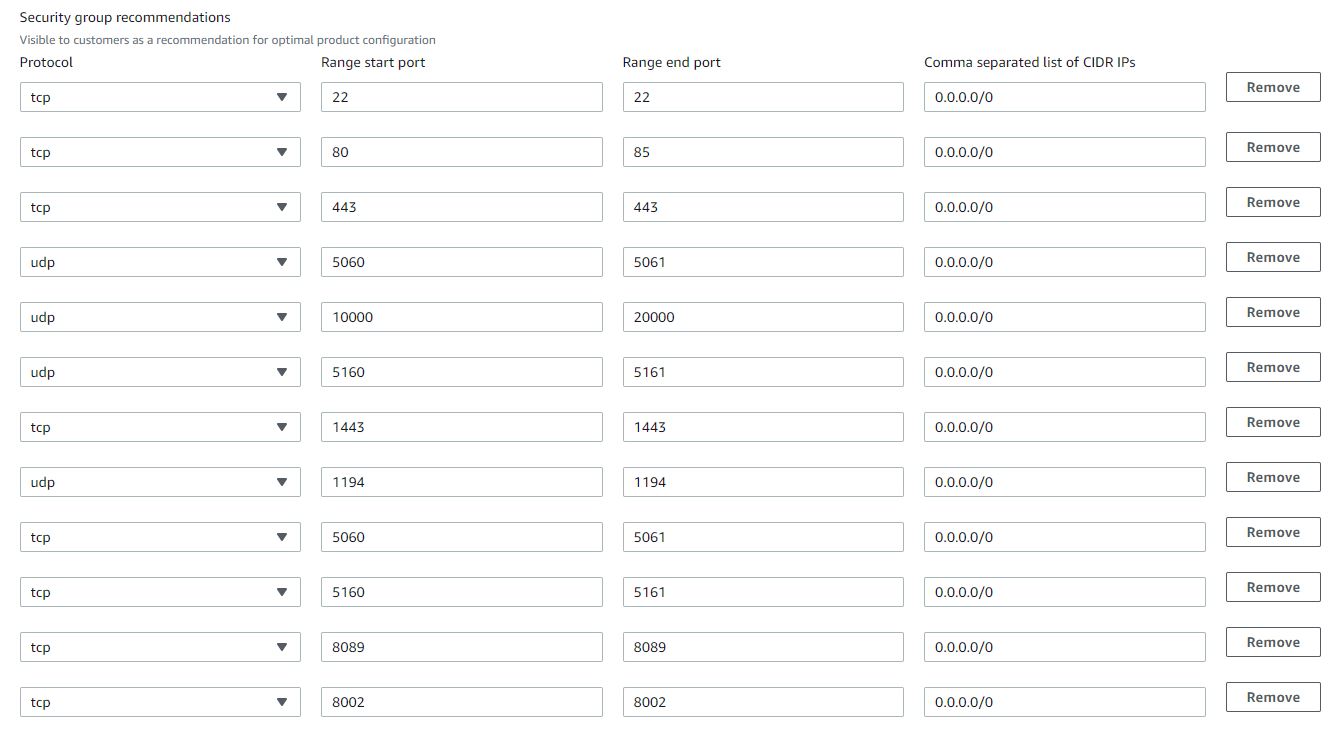
PBX Admin Access
| PORT | TCP/UCP | PURPOSE | CHANGING PORT | SECURITY | NOTES |
|---|---|---|---|---|---|
| 22 | TCP | SSH Console | This can only be changed inside from inside Linux CLI and not recommended to be changed. | Not recommended to open this up to untrusted networks. | Port used to allow SSH to the PBX from the outside world. |
| 80 | TCP | PBX GUI HTTP (Non HTTPS) | Can change this port inside the PBX Admin GUI > System Admin Module > Port Management section. | Not recommended to open this up to untrusted networks. | |
| 443 | TCP | PBX GUI HTTPS | Can change this port inside the PBX Admin GUI > System Admin Module > Port Management section. | Not recommended to open this up to untrusted networks. | |
| 1194 | TCP/UDP | OpenVPN server | Change not supported | Can open to untrusted hosts | Used to connect OpenVPN clients to PBX VPN Server. |
PBX SIP and IAX Communication
| PORT | TCP/UCP | PURPOSE | CHANGING PORT | SECURITY | NOTES |
|---|---|---|---|---|---|
| 5060 | UDP | chan_PJSIP Signaling | Can change this port inside the PBX Admin GUI SIP Settings module. | Not recommended to open this up to untrusted networks. | Standard Port used for chan_PJSIP Signalling. |
| 5061 | TCP / UDP | chan_PJSIP Secure Signaling | Can change this port inside the PBX Admin GUI SIP Settings module. | Not recommended to open this up to untrusted networks. | Secure Port used for chan_PJSIP Signalling. |
| 5160 | UDP | chan_SIP Signaling | Can change this port inside the PBX Admin GUI SIP Settings module. | Not recommended to open this up to untrusted networks. | Standard Port used for chan_SIP Signalling. |
| 5161 | TCP / UDP | chan_SIP Secure Signaling | Can change this port inside the PBX Admin GUI SIP Settings module. | Not recommended to open this up to untrusted networks. | Secure Port used for chan_SIP Signalling. |
| 10000-20000 | UDP | RTP for SIP | Can change this port inside the PBX Admin GUI SIP Settings module. | Safe to open to the outside world and is required by most SIP Carriers as your RTP traffic can come from anywhere. | Used for the actual voice portion of a SIP Call. |
| 4569 | UDP | IAX | Can change this port inside the PBX Admin GUI IAX Settings module. | Not recommended to open this up to untrusted networks. | Used for IAX protocol and trunking |
| 4000-4999 | UDP | FAX UDPTL | Not configurable in the GUI, only by editing custom conf file. | Used for T38 fax media |
PBX User Control Panel (UCP)
| PORT | TCP/UCP | PURPOSE | CHANGING PORT | SECURITY | NOTES |
|---|
aws_freepbx/ec2_security_groups.txt · Last modified: by TheWebMachine