Table of Contents
Installing AWS Polly TTS
Polly TTS is a better sounding alternative to the PicoTTS functionality built into FreePBX. This allows you to build amazing sounding Text to Speech elements for inclusion in your Dialplan.
Installation
Access your instance via SSH and execute the following command to run the installation script:
smartupgrade install-pollytts
Please note that SmartUpgrade is a utility unique to AWS FreePBX from TheWebMachine Networks. If you got here by searching the internet and are not using AWS FreePBX from TheWebMachine Networks, you can still use our install-pollytts script and AWS Polly for TTS by running the following command from the root console of your FreePBX server. You do still need to have a valid AWS Account in order to use AWS Polly:
curl https://files.thewebmachine.net/install-pollytts.sh | bash
Towards the end of the installation, you will be asked for the following information:
- AWS Access Key ID
- AWS Secret Access Key
- You can generate these keys from the AWS IAM Management Console
- AWS Region Code
- Use the region closest to your server for optimal performance; will default to
us-east-1if not specified
- AWS Polly Voice ID
- Will default to ‘Joanna’ (en-US) if not specified.
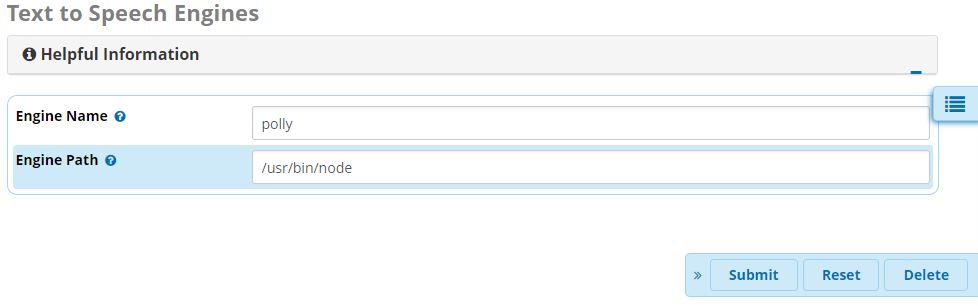
Once the script is finished, you’ll want to add the polly engine via Settings > Text to Speech Engines and specify /usr/bin/node as the Engine Path:
Caveats, Considerations, and Limitations
Please be advised of the following limitations when using the AWS Polly engine to create TTS elements:
- You CANNOT use single quotes/apostrophe
’including contractions (usedontinstead ofdon’t), double quotes“, or carriage returns/newlines in your spoken text. Any of these (and possibly other special chars) will break the playback and you will get either only a partial audio file or no audio at all. Polly will automatically pronounce contractions without an apostrophe (like “dont”) correctly - You CANNOT use SSML at this time because the FreePBX TTS module does not support it
- AWS Polly has a 3000-character limit per API request. If you send more than this in a single TTS element, you will get no audio. If you need to provide spoken word longer than 3000-chars, simply break it down into multiple TTS elements and string them together in sequence within your dialplan (Part1 Destination → Part2; Part2 Destination → Part3, etc)
You CAN use Asterisk Channel Variables in your TTS elements, which can greatly expand the variability of the elements you create. You can use variables like ${CALLERID(name)} to say the Caller's name or you can ensure you just speak the Caller's first name using the CUT function like this: ${CUT(CALLERID(name), ,1)} (there is a space between the two comas, which is the delimiter)
That’s it! Now you may create new TTS elements in Applications > Text to Speech and select polly as the engine to use.
Final Notes About AWS Polly
- AWS gives customers 5 million characters per month for free for the first 12 months, starting from your first request. You pay for usage beyond that ($4 per million chars). The way the TTS module is currently written, your TTS audio files are preserved in /var/lib/asterisk/sounds/tts/ after the first time they are encoded. So long as that TTS element text field remains unchanged AND you are NOT using Asterisk Channel Variables in the elements (which are dynamically generated during each call), no additional requests will be made to Polly for that TTS element. AWS Polly Pricing: https://aws.amazon.com/polly/pricing/
- If you ever want to change which AWS Polly voice you are using, simply run
install-pollyttsagain and select a new voice. You'll be asked if you want to delete all existing TTS audio to regenerate elements in the new voice