Table of Contents
Introducing SmartUpgrade
NO MORE GUESSING which version you have!
NO MORE FUMBLING with downloading a bunch of different files!
ONE CONVENIENT COMMAND you can run any time to ensure your system is running the latest and best we have to offer!
WARNING: DO NOT ATTEMPT TO INSTALL OR USE SMARTUPGRADE ON A LOCAL FREEPBX SYSTEM OR CLOUD SYSTEMS PROVIDED BY OTHER COMPANIES! SMARTUPGRADE WILL ONLY FUNCTION ON AWS FREEPBX BY THEWEBMACHINE NETWORKS AND WILL PROBABLY BREAK OTHER SYSTEMS!
The Basics
If you require a tutorial on connecting to your instance via SSH, please see the following guide: SSH Connection Tutorial
To simply upgrade your instance to the latest TWM-AMI version (–auto is optional):
smartupgrade [--auto]
To run a custom command or script (–auto and parameter are optional):
smartupgrade [--auto] name-of-custom-command [parameter]
We have also released a new “Expert Mode” menu system to allow for things like patches/fixes status and installation, troubleshooting utilities, and convenient maintenance tasks like switching asterisk versions, cleaning up temp files, S3 Bucket sync and Automatic File Deletion services! You can access the EXPERT-MODE menu by running the following command.
NOTE: EXPERT-MODE must be in ALL CAPS and you CANNOT use the –auto option:
smartupgrade EXPERT-MODE
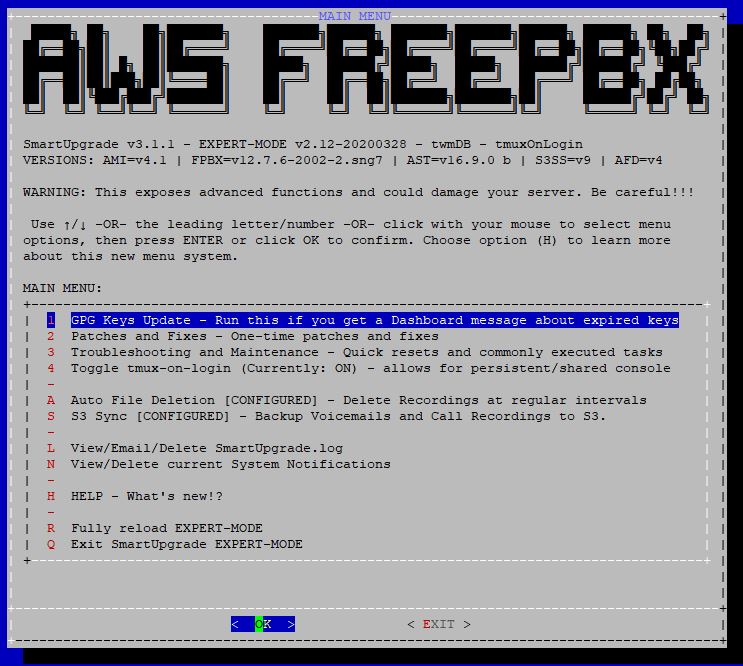
Command List
Just remember the SYNTAX:
smartupgrade [--auto] <custom-command>
--auto
- This tells SmartUpgrade to proceed without seeking user confirmation. This allows you to call upon SmartUpgrade in non-interactive modes (or called from another script) to accomplish tasks.
- USE THIS OPTION WITH CAUTION!
WE STRONGLY ADVISE AGAINST setting up SmartUpgrade as a cron job or other unattended process! Because you are relying on your PBX for potentially critical dialtone service to reach the world, including emergency services, running SmartUpgrade unattended could result in an unexpected outage, creating risk and liability for your organization and those served by your phone system!
EXPERT-MODE
- This MUST be the only option when used and launches the SmartUpgrade EXPERT-MODE menu system. This allows you to have more finite control, status information on available updates/fixes/patches, and the ability to complete advanced maintenance tasks.
PLEASE READ ALL PROMPTS AND WARNINGS VERY CAREFULLY WHEN USING EXPERT-MODE!
fix-postfix
- This is used to fix postfix permission issues that are preventing alert and voicemail notifications from being sent by your instance. If you are not receiving these emails from your instance and you are certain your settings are correct, you may wish to try this fix.
- For more information, please see this FAQ: fix_postfix
- NOTE: This cannot be used in conjunction with the –auto option, as there is no user intervention required by default.
install-pollytts
- This will install AWS Polly TTS Engine support
- Additional setup is required! Please see this guide for more information: pollytts
manage-support-keys [install|remove|restore-admin]
- This is used when working with a Support Technician on a Paid Support Ticket to install or remove our SSH keys for remote access to your instance
- This can also be used to reset the GUI 'admin' password back to the Instance ID by running with the restore-admin option
patch-glibc
- This will update glibc to address a critical vulnerability. This vulnerability affects all previous versions of glibc and all versions of linux running those versions. This patch script makes no other changes to your system and has been incorporated in all other SmartUpgrade scripts. You should only need to run this patch separately under special circumstances.
- For more information, please see this CERT article: http://www.kb.cert.org/vuls/id/457759
purge-qcb
- This command cancels any Queue CallBack (VQPlus/Queues Pro) pending calls, scheduled automatically or by the caller, in a queue (NOT Callback Module)
purge-cbm
- This command cancels any Callback Module pending calls (NOT Queue CallBack)
rotate-astmgrpass
- This will rotate the main Asterisk Manager password used for communication between Asterisk and FreePBX
- This is the same password located in
/etc/asterisk/manager.confandGUI > Settings > Advanced Settings - There should be NO user changes required after running this command
NOTE: If you setup applications that connect to the Asterisk Management Interface, you should be specifying your usernames, passwords, and permissions for those custom Manager users in /etc/asterisk/manager_custom.conf for proper security and auditing
show-current-version
show-versions
- This will show your current TWM-AMI version number. If you are running an older system and are missing the TWM-AMI version tags or you have made other major customizations to the core software, this will calculate your current TWM-AMI version and generate new version tags to speed up future upgrades
show-log
- This will display the SmartUpgrade.log file allowing you to see debugging information from your recent upgrades. You will also be given the option to delete the log and even email a copy to yourself after you exit the log viewer. You can send this log to us to assist in troubleshooting if you contact us for upgrade issues
smartupgrade-installer
- This option is for repairing or upgrading the base stub of the SmartUpgrade system. If you run into problems such as script looping (it just keeps displaying the same status messages again and again), an error message or any other unexpected messages, try running with this option to ensure you have all the latest components
tail [afd|s3ss]
- This is used to show a live running log for the <serviceID> specified after tail
- You MUST specify either
afdfor Auto File Deletion ors3ssfor S3 Sync Service - You cannot use the
–autooption with this command
update-gpg-keys
- This is used to manually update all GPG keys on the system
- We automatically update GPG keys as part of a normal update run; so there should be rare need to run this manually
vm-storage-switch
- This is used to switch between Local and IMAP Storage methods for Voicemail.
THERE ARE SIGNIFICANT STEPS AND CONSIDERATIONS TO BE MADE WHEN SWITCHING VM STORAGE TYPES, YOU MUST READ THE FOLLOWING GUIDE BEFORE YOU SWITCH STORAGE: Switching to/from IMAP Voicemail Storage
wipe-cdr-db
- This is used to wipe clean the CDR and CEL databases. This does NOT delete any call recording audio files from the local filesystem!